
The AI email writer you can just talk to
Dictate or type a few rough sentences. DictateMail asks a quick question if anything is missing, writes a clear, ready-to-send email and translates it when you need to write in another language.
- Free to use
- No sign-up
- Works in Chrome and Edge

How it works
How to write an email with AI in four steps
No prompts to craft and no templates to fill in. Say what you need the way you would tell a colleague.
-
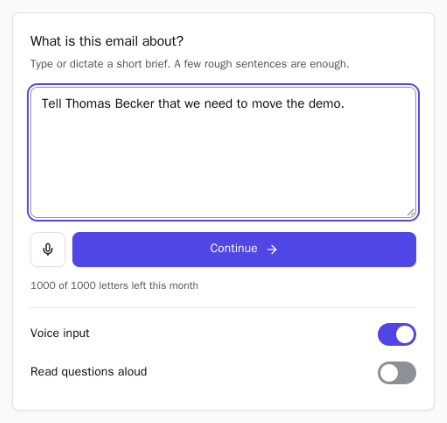
Dictate or type a short brief
Press the mic and say what the email is about, in your own language. A few rough sentences are enough, for example: “Tell Thomas we need to move the demo.” Prefer the keyboard? Just type it.
-
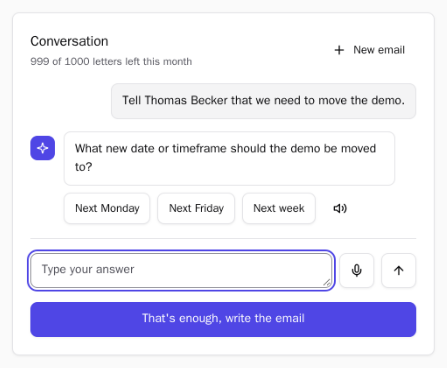
Answer a quick question
If something important is missing, like a date or a name, DictateMail asks. Tap a suggested answer, reply by voice or in your own words, or skip straight to the draft. Questions can even be read aloud.
-
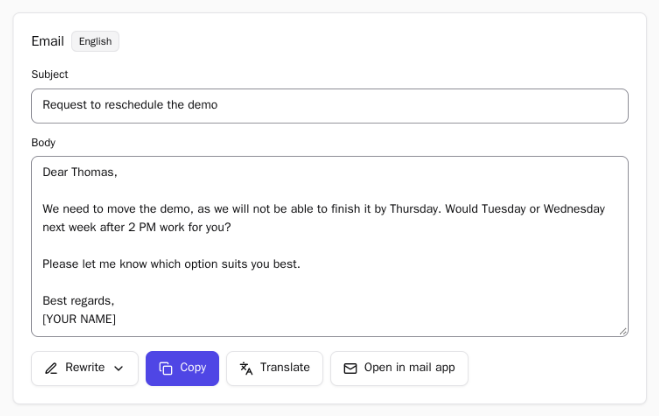
Get a ready-to-send email
A clear subject line and a polite, well-structured body with your signature. Edit any word, then copy it into Gmail, Outlook or any other mail client, or open it in your default mail app.
-
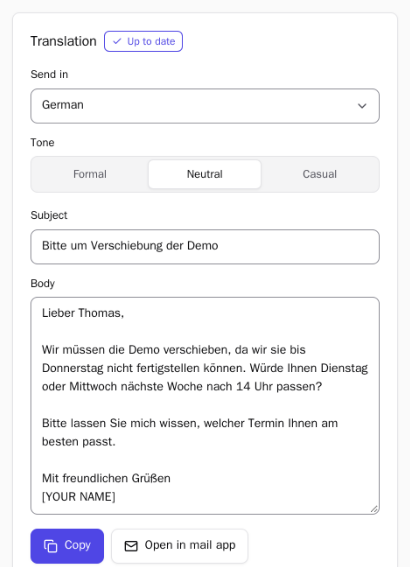
Translate it, if you need to
Pick one of 36 languages and a tone: formal, neutral or casual. DictateMail keeps your meaning and the right form of address, and can translate the result back so you can check it before sending.
Features
Everything you need to write better emails, faster
Voice to text, an AI email assistant and a translator in one Chrome extension.
Voice to text dictation
Speak instead of typing in any of 59 languages. DictateMail turns your words into a polished email, not a raw transcript.
Asks before it writes
Smart follow-up questions fill in the gaps, so the first draft already says what you mean.
Rewrite in one click
Make the email shorter, more formal or softer without starting over. Or edit the text yourself.
Translation with the right tone
Send your email in 36 languages. Choose formal, neutral or casual, and check the meaning with a back-translation.
Works with any mail app
Copy the result into Gmail, Outlook or Apple Mail, or open it in your default mail app with one click.
Right next to your work
Opens in the browser side panel next to the page you are on. Need more room? Switch to a full tab.
Use cases
Made for the emails you write every day
From a two-line reply to a careful business letter, DictateMail builds a professional email format for you.
What you can write
- Meeting requests and schedule changes
- Replies to clients and partners
- Follow-ups, reminders and polite requests
- Job applications and cover letters
- Emails in a language you don't speak well
Who it's for
- Sales and support teams
- Recruiters and hiring managers
- Freelancers and founders
- Students and job seekers
- Anyone who writes to people abroad
Private by design
DictateMail only works with what you type or dictate into it. Your settings stay in your browser.
Read the Privacy Policy- No accountNothing to sign up for. No name, email address or Google account needed.
- No inbox accessThe extension doesn't read or change the websites you visit, including your email.
- Nothing keptYour brief, recording and email are not stored on our servers after the reply is returned.
- No ads, no trackingWe don't sell data, show ads or track your browsing.
FAQ
Frequently asked questions
What is DictateMail?
DictateMail is an AI email writer for Google Chrome and Microsoft Edge. You dictate or type a short brief, answer a quick question if needed, and get a ready-to-send email that you can edit, rewrite or translate.
Is DictateMail free?
Yes. DictateMail is free to install, and right now every user can start up to 1,000 new emails a month at no cost. There is no sign-up and no credit card.
Do I need an account?
No. There is nothing to sign up for. On install, the extension creates an anonymous token that is not linked to your name, email address or Google account.
Does DictateMail read my inbox?
No. DictateMail does not read or change the websites you visit, including Gmail or Outlook. It works in the browser side panel, and you decide what to copy or send.
Which languages does it support?
You can dictate and write in 59 languages and translate your email into 36. The interface is available in English, German, French, Italian, Spanish, Portuguese and Russian.
Does it work in Microsoft Edge?
Yes. Edge installs extensions from the Chrome Web Store. Open the DictateMail page in the store, allow extensions from other stores if Edge asks, and install it as usual.
How do I open DictateMail after installing it?
Click the DictateMail icon in the toolbar to open it in the side panel. If you do not see it, click the puzzle icon and pin DictateMail. Need more room? Choose “Open full screen” to use it in a tab.
Is my data stored?
Your brief, your voice recording and the generated email are processed only to write your email and are not stored on our servers afterwards. We do not sell data, show ads or track your browsing. Details are in our Privacy Policy.
Write your next email in seconds
Install DictateMail from the Chrome Web Store and turn a spoken idea into a professional email.